Clipman
Clipboard history utility
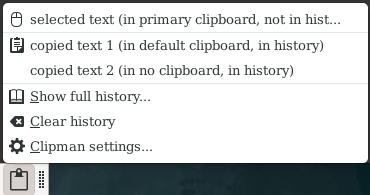
Clipboard Manager provided as a panel plugin for Xfce and as a standalone application running in the notification area. It keeps a history of text and images of content copied to the clipboard. It also has a feature to execute actions on specific text selection by matching them against regexes.
Clipman enables you to store and recall X selections, as well as GTK+ clipboard content. You can also define actions to be triggered by selecting some text pattern. . This package uses Xfce libraries but can be used without the Xfce panel and only requires a system tray (notification area).
How to install Clipman in Ubuntu
If you are on a supported distro like Ubuntu, Linux Mint, elementary OS etc. you can install the application through software center by clicking the below link.
If the above link not working, run the below command in terminal to install xfce4-clipman in Ubuntu
sudo apt install xfce4-clipman
Clipman Screenshots